Every HandyCafe feature, in eight sections.
How each feature works and which package it comes in. Ordered the way a cafe owner's day goes, from the first session to closing time.
Features marked Pro are only in HandyCafe Genesis Pro. Everything else is in both packages.
Every feature in 95 seconds.
From the first session to closing time, in the order a cafe's day runs.
Subtitled. Sound turns on when you press play.
PC and game console sessions on one screen.
Start prepaid or postpaid sessions and let the weekly pricing calendar work out the charge. When time runs out the PC locks.
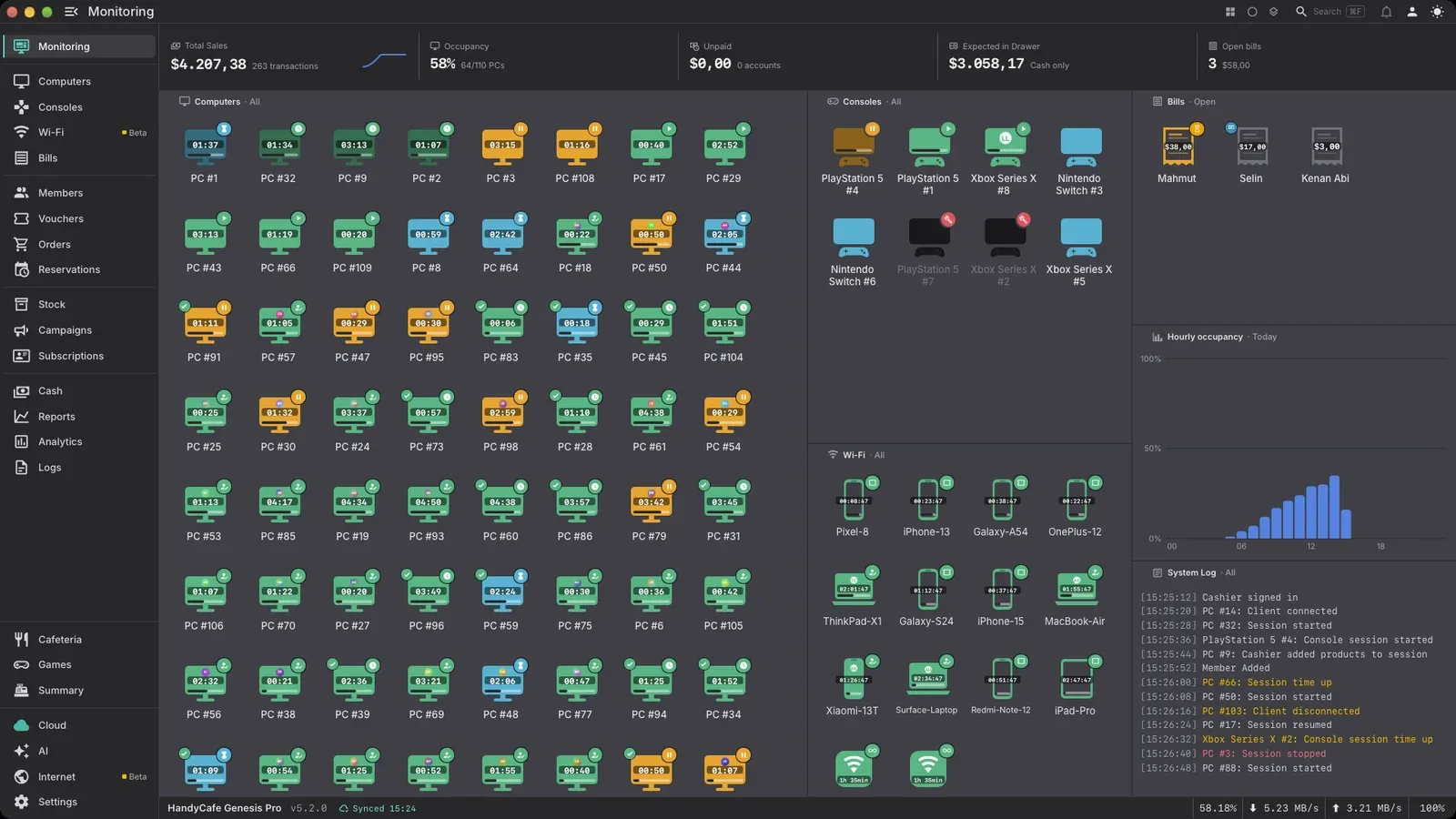
Game consoles turn on and off with the sessionPro
HandyCafe finds your PlayStation on the network by itself. It switches the console on when a session starts and puts it in rest mode when time is up. The game being played shows on screen.
Each console needs a one-time pairing. PlayStation only for now.
- Zones and free layoutArrange PCs to match your floor plan.
- Live statusBusy, free and expired PCs at a glance.
- Prepaid and postpaidStart a session by time or by amount.
- Weekly pricing calendarThe night rate starts on its own when the hour comes.
- Move and pauseDrag a session over to another PC.
- Card and Pulse viewsProEach station's session and revenue on a large card.
Show allShow less
- Voucher or member loginCustomers start their own session from the lock screen.
- Seat requestsA customer asks for a session at the station and the cashier approves it.
- NFC card loginProCards for members and staff.
- QR login with the Gamer appProMembers scan the code on the screen with their phone.
- Paid equipmentProControllers, headsets and racing wheels are added to the session.
- Reservations and waiting listProBook stations ahead and keep the queue in order.
Everything the customer sees on the PC.
From the lock screen to the game launcher, you decide what customers see.
Game Mode launcher and 22 themesPro
Games are sorted into categories and open with your cafe's colors and background. Time left stays at the top of the screen. In HandyCafe Genesis the client runs in desktop mode.
- Lock screenStandard, Media and Mixed modes.
- App menuGames and apps sorted into categories.
- Announcements and eventsWith view and click counts.
- 25 languagesCustomers pick their language on the lock screen.
- Player showcaseProPut your regulars in the spotlight on the idle screen.
- Cloud game catalogProStart game installs from one place.
Show allShow less
- Game license poolProYou decide which PC gets which game account.
- AI chat for customersProThe cost is added to the session.
Orders, stock and bills in the same program.
Customers order from their PC or from the QR menu on the table. Stock goes down by itself and the amount goes on the bill. Stock tracking is in both packages.
From QR menu to kitchenPro
A customer scans the QR code on the table and the menu opens on their phone. The order prints on a kitchen ticket and the amount is added to that table's bill.
The cafeteria needs a cloud connection. If the internet goes down, the cafe stays open. HandyCafe runs on your own computer. Cloud features pick up where they left off once the connection is back.
- Ordering from the PCCustomers order without leaving their seat.
- Bills and partial paymentsSplit the bill and collect the rest later.
- Stock and suppliersAdd stock from purchase receipts. In both packages.
- ExpensesRent, utility bills and purchases next to your revenue.
- Printing and USB chargesCharge per page and per copy.
- Table plan and kitchen ticketsProOrders go to the right table and the kitchen.
Show allShow less
- Call the cashierProCustomers call the cashier from the QR menu.
- Wi-Fi session managementProCharge for phones and customers' laptops. Details
Balance, packages and subscriptions that bring members back.
Members top up a balance and play on their own account. Campaigns and loyalty levels give members their own prices.
Monthly subscriptionsPro
Plans for 1, 3, 6 or 12 months. Each month, include play time, a cafeteria discount or free items. Unused allowance can roll over to the next month.
- WalletMoney and time balances are kept apart.
- Top-up bonusesAdd a bonus to balance top-ups.
- Packages and campaignsTime packages and discounted offers.
- Loyalty levelsMembers level up as they collect points.
- Member rateA separate hourly rate for members.
- HandyCafe GamerProMembers log in with a QR code and see their balance and level.
Show allShow less
- Pay laterA tab for members with no balance left.
- Member panelMembers check their balance and history on the PC.
Fix a problem PC without walking over to it.
See the screen, take over the mouse and keyboard, send files and restart the PC.
Remote desktop
With mouse, keyboard and clipboard sharing. Image quality depends on your package. Session recording is in Pro.
- ScreenshotsOne click and it's there.
- File explorer and commandsSend files and run commands.
- Power actionsShut down, restart or wake over the network.
- Client restrictionsApp blocking plus Chrome and Edge policies.
- Session recordingProSave remote sessions as MP4.
- Cheat protectionProTamper detection and Steam VAC checks.
Show allShow less
- Folder transferProWhole folders and multiple files.
- Health checks and scheduled tasksProPut maintenance jobs on a schedule.
Your internet line and web filter, run by HandyCafe Gateway.Pro
HandyCafe Gateway becomes your cafe's network gateway. It installs on a Windows PC in the cafe. You don't need an extra computer, just two network cards in that PC.
- Web filter11 categories with rules per device group.
- Speed limitsDownload and upload caps per device and group.
- Device managementEvery connected device shows up by name and can be blocked in one click.
- Multiple internet linesLines back each other up.
IP logging is in both packages. The log is sealed every day and HandyCafe Genesis keeps it too.
Who sold what and which hours were busy.
Every transaction is recorded under a cashier. Reports are compared with the previous period.
Occupancy heat map
Every day of the week, hour by hour. Spot the quiet hours and set your pricing calendar around them.
- End-of-day summaryThe day's revenue line by line, per cashier.
- Cashier rolesWho sees what and who can change what.
- Period comparisonAgainst the previous period or the same week last year.
- Revenue per stationFind the stations that bring in nothing.
- Tax tabTaxable amount, tax and CSV export.
- HandyCafe AIProAsk your reports a question and get the answer as a table and chart.
Show allShow less
- 7-day forecastExpected revenue for the week ahead.
- Report BuilderProBuild your own reports.
- HandyCafe ManagerProKeep an eye on the cafe from your phone. iOS and Android.
- Multiple branchesProAll your cafes in one panel.
- Cloud backupProMembers, balances and revenue history stay safe.
- Anonymous benchmarksProSee how your cafe compares with similar ones.
Switch from another program and bring your data.
Your members come over to HandyCafe with their balances, along with your products and revenue history. The switch can be undone, so you can go back if it isn't for you.
- Members
- Wallet balances
- Products
- Cashiers
- Revenue and expenses
- A switch you can undo
Programs we can move you from: HandyCafe Legacy, PanCafe, EveryCafe, AKINSOFT and NetCafeM.
Read the migration guideWhat sets HandyCafe Genesis and Genesis Pro apart.
HandyCafe Genesis Pro has everything in HandyCafe Genesis and adds more on top.
| Feature | HandyCafe Genesis | HandyCafe Genesis Pro |
|---|---|---|
| Trial | ||
| Free trial | No trial | 14 days, 5 PCs + 5 game consolesNo card needed, start it from inside the program |
| Sessions and sales | ||
| Timed sessions, billing and campaigns | Included | Included |
| Members, wallet and loyalty | Included | Included |
| Products, stock, revenue and daily reports | Included | Included |
| IP access logs | Included | Included |
| PC and game console monitoringCard and Pulse views in HandyCafe Genesis Pro | Icons and list | All views |
| Remote management | ||
| Remote desktop resolution | Up to 720p | Up to 4K |
| File transfer | Single files | Folders and multiple files |
| Session recording | Not included | Included |
| Scheduled client tasks and health checks | Not included | Included |
| Revenue modules | ||
| Cafeteria, QR menu and kitchen tickets | Not included | Included |
| Wi-Fi session management and guest portal | Not included | Included |
| Member subscriptions | Not included | Included |
| Reservations | Not included | Included |
| HandyCafe Gateway and firewall | ||
| Advanced web filter | Not included | Included |
| Per-PC speed limits | Not included | Included |
| Load balancing across internet lines | Not included | Included |
| Switching to a backup line when one drops | Not included | Included |
| Port management | Not included | Included |
| Firewall | Not included | Included |
| Games and game consoles | ||
| Cheat protection: tampering, HWID and Steam VAC | Not included | Included |
| Online game catalog and license pool | Not included | Included |
| Turning PlayStation on and into rest mode over the network | Not included | Included |
| Cloud, mobile and AI | ||
| Cloud management panel and backups | Not included | Included |
| Mobile app for cafe managersRevenue, sessions and PCs from anywhere | Not included | Included |
| Mobile app for membersQR login, wallet, packages, loyalty and reservations | Not included | Included |
| AI chat and revenue suggestions | Not included | Included |
| Report Builder | Not included | Included |
| NFC member cards and client themes | Not included | Included |
| Setup | ||
| Server operating system | Windows only | Windows, macOS and Linux |
| Choose a package | Subscribe | Try for 14 days |
Try Genesis Pro free for 14 days.
With 5 PCs, 5 game consoles and every Pro feature. No card needed.
Want more detail? Read the docs